Opening AI Platform Crawlers, That’s Good but..
Background Why I Wrote About Allowing AI Platform Crawlers
I think this came around the middle of 2025. I was doing quick checks and observations on some random websites and on a few website owners’ sites. I kept finding the same thing: the hosting provider or the CDN provider was blocking all AI crawler access in robots.txt by default.
At that time I was thinking, “hey, why do you block AI platform crawlers in your robots.txt when at the same time you want your website to be discovered on AI platforms?” In my mind there were two possible scenarios:
- The website owner does not know about the default in their robots.txt declaration. That is exactly why they need us as SEO consultants.
- The website owner is aware of the situation and blocks AI crawlers intentionally, for reasons of their own.
Back then I tried to think positively, and the first scenario made more sense from my side. I was also seeing a lot of posts on LinkedIn and Threads where SEOs were quite sarcastic, underestimating any website that blocks AI platform crawlers and judging it immediately: “your website is bad, you are blocking AI crawlers.” That opinion made me stop and think.
Then a business came to me that wanted to increase its market share on AI platforms and asked me to check from a technical perspective. The first thing I saw was exactly this: AI crawlers blocked through robots.txt.
The Event That Changed My Perspective for All Clients
As an SEO, I believe most of you already know what my response in the preliminary analysis was: your site is blocking AI crawlers through robots.txt.
But the client’s answer surprised me. “We already know we blocked AI crawlers in our robots.txt, because we have a server that is not good with our current provider, and we want to migrate to another service provider and revamp our whole website right now.”
That response taught me something. We cannot judge a website too fast. Deep down I felt guilty for making an assumption so quickly, because I knew the problem but I did not try to hear the explanation first.
Preparation Before Turning Disallow AI Crawlers Into Allow AI Crawlers in Robots.txt
For context, the website is an OTA with prices that change all the time. So we needed to be sure from a technical perspective first. The preparation I want to share here is only about making sure that allowing AI crawlers would not hurt our web service performance.
It looks easy to change Disallow into Allow for all AI crawlers. But behind that, we worked very hard to make sure our web infrastructure would hold.
#1 Preparation: Smoke Test 200 Times More Than Normal Requests
Before the migration launched, we tested in staging with a smoke test, from the engineering side and from the SEO side. In total we ran 200 times more requests than the average crawler volume. This was to make sure the new infrastructure could receive many more AI crawler requests in the future.
From my side I used Screaming Frog with a speed configuration of 50 max threads and 20 URLs per second, with JavaScript rendering turned on. (Thanks to Screaming Frog for building such an amazing tool. I have been using it since 2018. Hopefully after this I can get a sponsorship from Screaming Frog, haha, just kidding.) So theoretically we could test around 1,200 requests per minute, but it should be higher, because it is not only the URL being requested. It also requests the other bundles, assets and JavaScript on every URL.
Did I expect 100% success from the smoke test? No. For that level of business I do not think we should have an expectation of 100%, and we never had it. The failure rate (5xx) was almost 15% at first, but after improvements on the backend such as query requests, API requests and auto scaling services, we reduced the failure rate to 1.5%. From my perspective and from the engineers’ perspective, that is still acceptable and counted as checked in the smoke test.
#2 Preparation: Dividing the Smoke Test Into 2 Types of Crawling Simulation
This comes from crawler behaviour. We can never control 100% of how crawlers crawl our pages. So I split the smoke test in two. First, crawling freely from the homepage, whatever the crawler wanted to take. Second, requesting only a single PDP page. The setup stayed the same. This was a worthwhile test for us to see how reliable our infrastructure really was.
#3 Preparation: We Only Allow the Important AI Crawlers
To be honest, there are too many AI crawlers. I always think that not every AI crawler from every platform is important. Based on our audience and geography, only ChatGPT, Gemini and Perplexity mattered for us. So we still block the rest of the AI crawlers, haha.
Highlights After Allowing AI Platform Crawlers to Crawl
#1 Highlight: +700% Total Requests Increases the Overall Cost
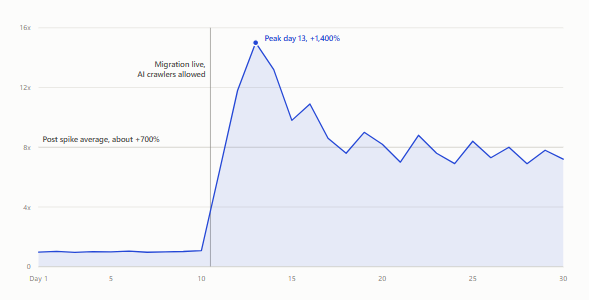
What we expected came true. The day after we launched the migration and opened robots.txt to the AI crawlers, the cost of services caused by requests to the website increased by up to 1,400% in the first 3 days, and by 700% after 3 days, compared to before the migration when AI crawlers were disallowed. Out of that total, AI crawlers requesting our website dominated with 60%.
This makes sense. Search Engine Journal reported that ChatGPT crawls 3.6 times more than Googlebot, and according to Cloudflare Radar, 52% of AI crawler visits to a website are for training purposes, with only 2.6% coming from a user action.
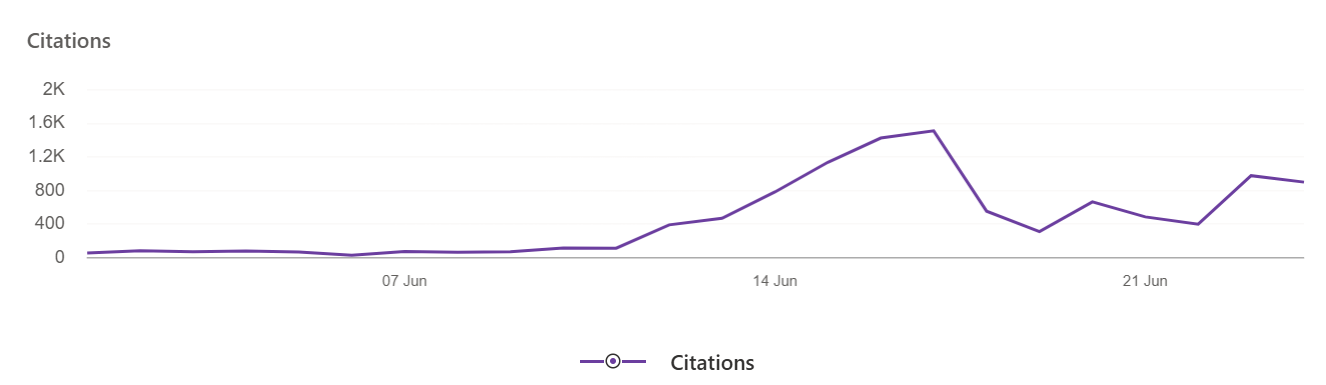
#2 Highlight: Citations Increased Based on Bing Webmaster Tools
What I Learned From My Case
My first lesson is not about the preparation. It is about listening to the website owner first, understanding the reason, and not judging in the first place. After that event, it changed how I communicate with everyone. As an SEO, maybe I cannot judge everything too fast. See, ask, hear, understand, then give the proper solution.
The second thing is that preparing before you allow AI crawlers in robots.txt is something you really need to consider, especially for big websites with dynamic content or components. Opening Allow for AI crawlers is really easy, but making sure everything is fine afterwards is the part you need to prevent problems in.
That is all my thought!
Got a crawling, rendering, or indexing problem?
Tell me about your architecture, your migration, or the pages search engines and AI keep ignoring. Replies within two business days.
Get in touchNote: engagements involving money games, gambling, or adult websites are not accepted.