How to Set Up IndexNow with Claude (Works for HubSpot, Webflow and All CMS Types)
Background
IndexNow is a simple protocol that lets you tell participating search engines the moment a URL is added, updated or deleted, instead of waiting for them to crawl and find it. You ping one endpoint with your URL and your key, and the engines that support IndexNow share that signal with each other, so one push reaches all of them. One push, many engines, lazy in a good way.
Benefit of IndexNow
The main benefit is speed and control. You push your new or updated URLs to the supported search engines yourself, so discovery does not depend only on the crawl schedule.
And here is the part most people miss: ChatGPT leans on the Bing index for a lot of its retrieval. So when Bing learns about your page faster through IndexNow, you also give yourself a bigger chance to be seen and cited by ChatGPT. For an AEO/GEO play, that is the real prize.
Give the IndexNow example
Here is what a single IndexNow submission looks like. This is a simple GET ping for one URL:
https://api.indexnow.org/indexnow?url=https://ekiriandra.com/blog/my-new-post/&key=1a2b3c4dDUMMYkey5678For more than one URL at a time, you send a small JSON body with a POST instead:
{ "host": "ekiriandra.com", "key": "1a2b3c4dDUMMYkey5678", "keyLocation": "https://ekiriandra.com/1a2b3c4dDUMMYkey5678.txt", "urlList": ["https://ekiriandra.com/blog/post-a/", "https://ekiriandra.com/blog/post-b/"] }What each field means:
host: your domain without the protocol (ekiriandra.com).
key: your IndexNow key. The dummy one here is 1a2b3c4dDUMMYkey5678. Never paste your real key into the article, unless you want strangers pushing URLs for you.
keyLocation: the public URL where your key file lives, so the engine can verify you own the site.
urlList: the list of URLs you are pushing in this one call.
Problem
Setting up IndexNow is easy when your CMS already does it for you. On WordPress there are plugins, and a lot of ecommerce platforms like Shopify either integrate IndexNow automatically or make it a one switch setup.
The question is what to do when you are on HubSpot or Webflow. This comes up a lot. At least until I write this, there is no official IndexNow setup documentation for those two, and when you handle international clients on HubSpot or Webflow it gets confusing fast. So in this guide I show a step by step that works for any environment or CMS, so you never feel stuck again when a client is on a platform that is not on the IndexNow supported list. No more scratching your head in front of the client.
How To Set Up IndexNow with Claude
1. Create your verification key. Generate a key from Bing Webmaster Tools (bing.com/indexnow). I suggest you create a Bing Webmaster Tools account and verify your site first. It makes it much easier to see later whether IndexNow is actually working.
2. Host the key file. IndexNow checks a small plain text file named after your key, for example 1a2b3c4dDUMMYkey5678.txt, that contains only the key itself. It must live on the same host as the URLs you push, usually at the root, so the engine can confirm the site is yours. WordPress and Shopify handle this for you. HubSpot and Webflow do not let you drop a file at the root, so here is the trick for each one.
On HubSpot: upload the file, then proxy it to the root
a. Create your key file (a .txt file containing only your key) and log into HubSpot.
b. Go to Library > Files (or Marketing > Files and Templates > Files, depending on your navigation), click Upload files and select your key file.
c. Click the file name to open its details panel, then click Copy URL to copy the HubSpot hosted URL.
d. Click the Settings gear in the top bar, go to Content > Domains & URLs, open the URL Redirects tab and click Add URL redirect.
e. Set Redirect type to Proxy, Original URL to your key file name (for example /1a2b3c4dDUMMYkey5678.txt), and Destination URL to the HubSpot file URL you copied. Click Save redirect.
Proxy is the important part. The address bar stays on your domain while HubSpot serves the file behind it, so the key looks like it lives at yourdomain.com/1a2b3c4dDUMMYkey5678.txt, exactly what IndexNow expects.
On Webflow: upload the file, then redirect it
a. Open your project in the Webflow Designer, click the Assets icon on the left panel and upload your key file.
b. Hover the file card, click the gear icon (Settings), then the link icon to copy the asset link. It will be a website-files.com URL.
c. Leave the Designer, open Site Settings and go to the Publishing tab, then scroll to 301 Redirects.
d. Set Old Path to the exact file name at the root (for example /1a2b3c4dDUMMYkey5678.txt) and Redirect to path to the full asset link you copied. Click Add Redirect Path.
e. Click Publish at the top right. If you skip this, nothing goes live, ask me how I know.
Note: this trick is not only for IndexNow or Bing Webmaster Tools. You can use the same upload and redirect method for any file based site verification, like the HTML verification file from Google Search Console or Naver Search Advisor (Naver Console). Same steps, just a different file. Bonus: the HubSpot proxy is the safest version because there is no redirect at all, so the file really looks like it lives on your domain.
3. Test the response. Ask Claude to push your homepage as a test. A 200 means the submission was received and your key is already valid. A 202 means it was Accepted but the key is still being validated, so it is also fine for a first test. Anything in the 4xx range means the key or the key file is wrong.
4. Confirm in Bing Webmaster Tools. Open the IndexNow section and you will see the list of URLs you pushed from your side.
What we can do further for our IndexNow?
These are my rules for a proper IndexNow setup, at least in my opinion.
1. Batching period. Decide how often you push: every time, every hour, or once a day. There is no exact formula, you adapt it to your business. A site that rarely changes can pool its URLs and push once an hour, while a news site makes more sense pushing on demand, the moment an article is published or revised.
To make it real, here is a simulation of a 10 minute batch on ekiriandra.com. It is a Wednesday morning and I am editing a few pages.
The situation
| Time | URL | What happened |
|---|---|---|
| 09:01 | https://ekiriandra.com/blog/indexnow-setup-hubspot-webflow/ | I publish a new blog post |
| 09:04 | https://ekiriandra.com/services/technical-seo-consultant/ | I add a new case study to the service page |
| 09:06 | https://ekiriandra.com/publications/ | I add a new talk to the publications page |
| 09:07 | https://ekiriandra.com/services/aeo-geo-technical-consultant/ | I update the AEO service page |
| 09:08 | https://ekiriandra.com/blog/indexnow-setup-hubspot-webflow/ | I fix a typo in the 09:01 post |
| 09:09 | https://ekiriandra.com/ | I update the homepage to feature the new post |
| 09:12 | https://ekiriandra.com/blog/save-ahrefs-api-units-with-ai/ | I refresh an older post with new numbers |
| 09:15 | https://ekiriandra.com/blog/old-event-recap/ | I delete an outdated event recap page |
| 09:18 | https://ekiriandra.com/about-me/ | I update the career section |
What happens in the queue
The CMS collects the changed URLs and removes duplicates automatically:
Queue after 09:01   1 URL   [new IndexNow post]
Queue after 09:04   2 URLs  [+ technical SEO service]
Queue after 09:06   3 URLs  [+ publications]
Queue after 09:07   4 URLs  [+ AEO service]
Queue after 09:08   4 URLs  [post already in queue, skipped]
Queue after 09:09   5 URLs  [+ homepage]
09:10: the 10 minute timer fires. Queue has 5 URLs. Flush.
The CMS sends this payload to IndexNow:
{
  "host": "ekiriandra.com",
  "key": "1a2b3c4dDUMMYkey5678",
  "keyLocation": "https://ekiriandra.com/1a2b3c4dDUMMYkey5678.txt",
  "urlList": [
    "https://ekiriandra.com/blog/indexnow-setup-hubspot-webflow/",
    "https://ekiriandra.com/services/technical-seo-consultant/",
    "https://ekiriandra.com/publications/",
    "https://ekiriandra.com/services/aeo-geo-technical-consultant/",
    "https://ekiriandra.com/"
  ]
}
The queue is empty again. The timer keeps running and more changes come in:
Queue after 09:12   1 URL   [refreshed Ahrefs post]
Queue after 09:15   2 URLs  [+ deleted event recap]
Queue after 09:18   3 URLs  [+ about me]
09:20: the timer fires again. Queue has 3 URLs. Flush.
Second payload:
{
  "host": "ekiriandra.com",
  "key": "1a2b3c4dDUMMYkey5678",
  "keyLocation": "https://ekiriandra.com/1a2b3c4dDUMMYkey5678.txt",
  "urlList": [
    "https://ekiriandra.com/blog/save-ahrefs-api-units-with-ai/",
    "https://ekiriandra.com/blog/old-event-recap/",
    "https://ekiriandra.com/about-me/"
  ]
}
And repeat, every 10 minutes.
Timeline summary
| Time | Event | URLs sent |
|---|---|---|
| 09:01 to 09:09 | 6 changes (1 duplicate) | queued |
| 09:10 | Flush #1 | 5 URLs |
| 09:12 to 09:18 | 3 changes | queued |
| 09:20 | Flush #2 | 3 URLs |
Total: 9 changes, 8 unique URLs notified in 2 batches.
Why 10 minute batching?
| Reason | Why it matters |
|---|---|
| Deduplication | If I fix the same page 5 times in 10 minutes, IndexNow gets 1 notification instead of 5. No wasted calls on the same URL. |
| Avoid rate limiting | IndexNow returns 429 Too Many Requests when you send too often. Batching keeps you far below that. |
| Efficient network usage | One POST with 10 URLs beats 10 separate requests. Less overhead, fewer things that can fail. |
| Still fast enough | 10 minutes is nothing compared to the days or weeks a crawler can take without IndexNow. |
| Handles burst edits | People publish in bursts, 5 to 10 pages in a short window. Batching absorbs that into clean submissions. |
2. Integrating with your CMS. On a custom CMS you can build a pooling mechanism: every day you collect the URLs that were created or edited, then a scheduler pushes them.
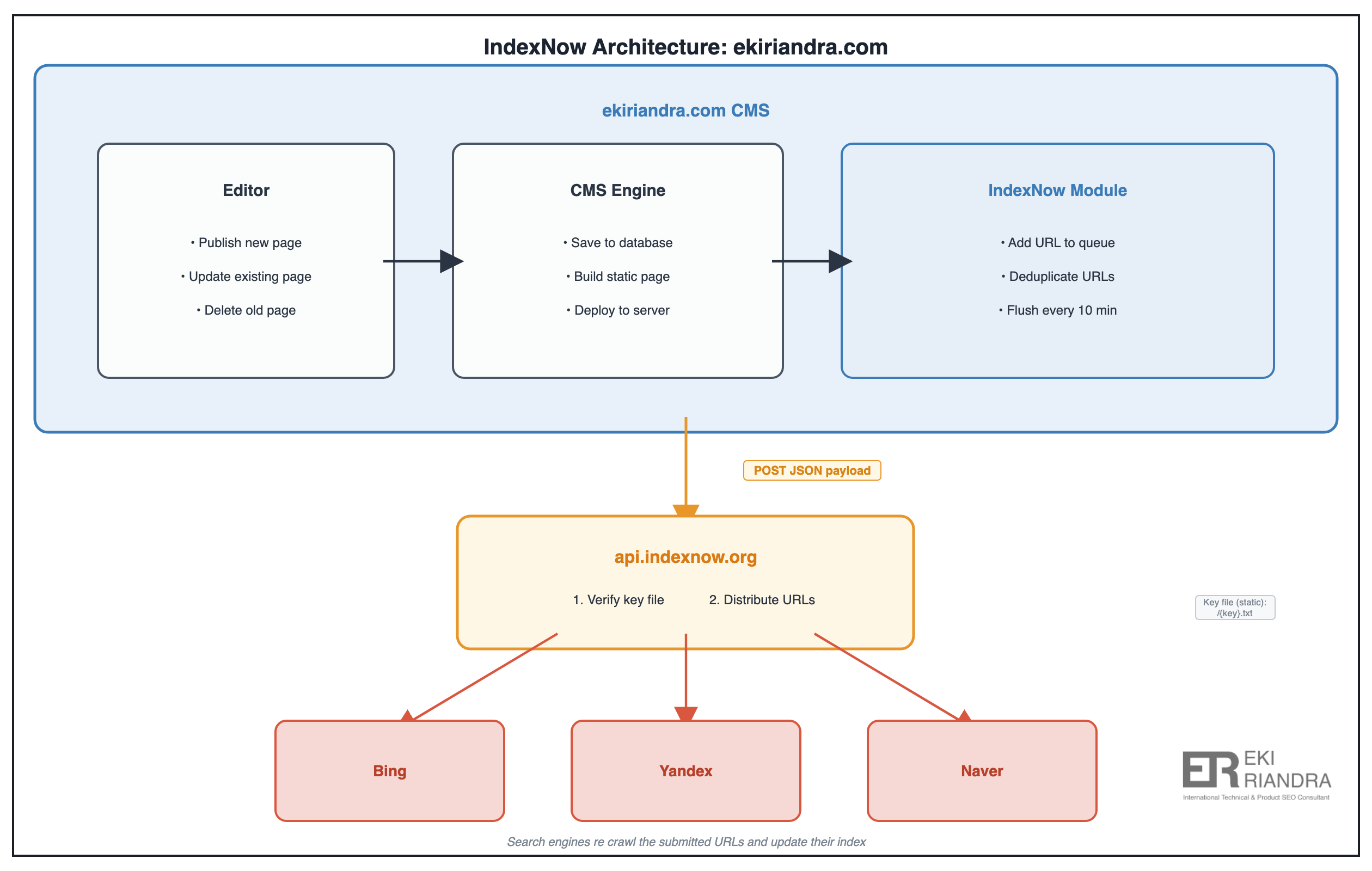
3. Create an internal log. This one is a must for me. Whatever your setup, always save the response of every push, one line per call. When Bing Webmaster Tools looks like it did not update but your scheduler says it ran, the internal log is how you check the real response instead of guessing. Guessing is the enemy.
Impact of Implementation of IndexNow
Across many cases I see a clear benefit from IndexNow, especially when the target market is Japan or China, where Microsoft Bing has real share. Last time I checked, around 30% in Japan, and around 20% in China as an alternative to Baidu.
One example, a client focused on the Japan market, after implementing IndexNow on a custom CMS: AI citations grew from around 220 a day to around 4,100 a day. That is roughly a 19x jump, close to +1,760%. Yes, that is not a typo.
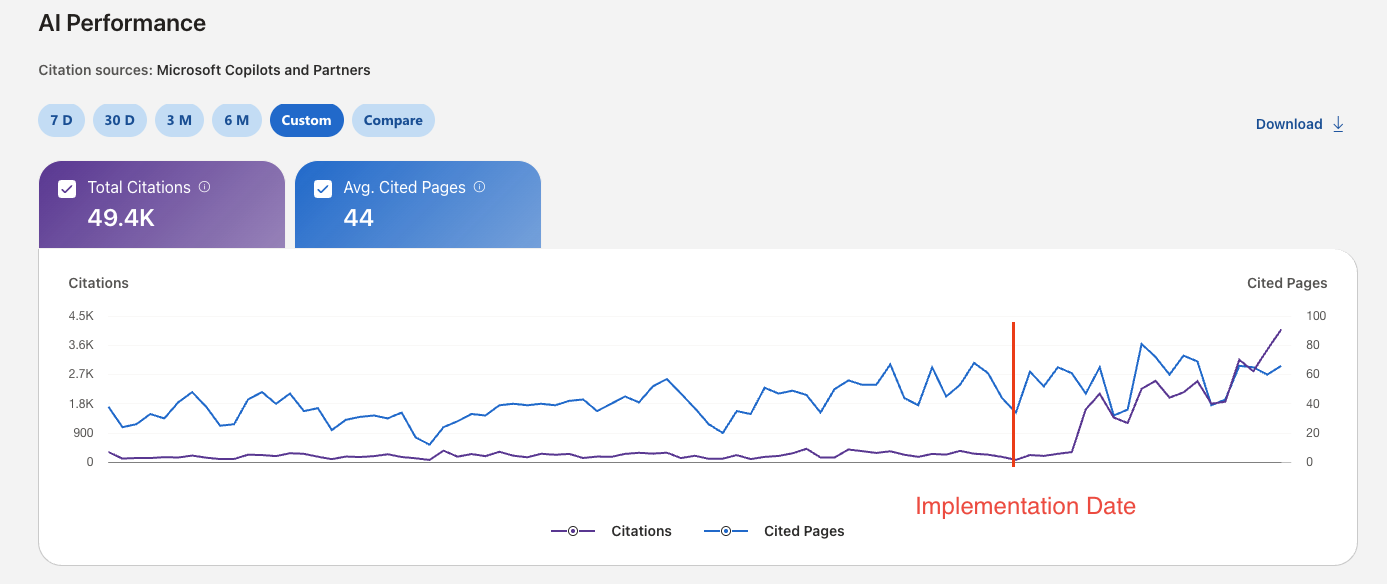
Of course other factors help too, like improving the content itself. But a jump like this is the pattern I mostly see after we connect IndexNow to a custom CMS.
Conclusion
So do not panic if your CMS, or your client’s CMS, does not support IndexNow by default. You can still build it yourself, and with an AI like Claude you can put it together quickly. No need to wait for an official plugin that may never come, haha.
That is all my thought!
Got a crawling, rendering, or indexing problem?
Tell me about your architecture, your migration, or the pages search engines and AI keep ignoring. Replies within two business days.
Get in touchNote: engagements involving money games, gambling, or adult websites are not accepted.