Server Side Rendering to Solve Discoverability, But Here Is the Preparation
Background Why I Wrote About Server Side Rendering
Around 2018, I remember Google launched second wave rendering, which told us “hey, I can see your website fully by executing JavaScript.” And yes, in my experience Google can execute JavaScript properly. One of the SEO sources of truth is the URL Inspection tool in Google Search Console, the Mobile Friendly Test (if you remember this one, then we are the same age, hehe) and the Rich Results Test. You might see the rendered HTML screenshot look completely fine and tell yourself, “so we do not need server side or prerendering, Google already sees our full content!” That is true, and you can run your website without server side rendering.
However, here are some notes from my own observation of this rendering method from Googlebot.
1. The URL Inspection Tool, Mobile Friendly Test and Rich Results Test Use a Different User Agent in Your HTTP Requests
When you check with Google’s tools, the URL Inspection tool for example, they use a crawler named “Google-InspectionTool/1.0”. But the crawler that Google uses to crawl and index your site for search results is Googlebot. Will that inspection crawler see your pages exactly 100% like Googlebot does? I do not know, it is a blackbox for me. It can be yes, it can be no. That is my honest answer, and it is something I cannot control.
2. Googlebot Might Have a Threshold for Waiting on Your Client Side Rendering to Fully See Your Website
When you rely on client side rendering and Googlebot (the web rendering service) comes to your pages, it has a threshold that we might not know: how many seconds Googlebot is patient enough to wait for your bundle or JavaScript to execute. Theoretically three cases can follow:
- Googlebot sees your main content fully through the final rendered HTML.
- Googlebot stops the process and sees the content in your rendered HTML as is, for some reason. It can be that your rendered HTML already reached 2MB (reference) or that the rendering process took more than 3 seconds (undocumented, but in my experience it is around 3 to 5 seconds before Googlebot might stop the rendering process). If your main content is fully seen, that is good. But what if Google stops before your supporting content, the content that should increase the relevancy of the page, can be read? There is a lost opportunity right there.
- Googlebot waits too long, but the client side execution on your website takes too long because your API responds too slowly, so it times out and breaks your pages (5xx). This last case is the one we should fully avoid, in my opinion.
Server Side Rendering, Still the Best Approach in My Opinion, at Least Until I Write This Article
When it comes to client side rendering, personally there are a lot of things I do not know and cannot control to make sure the main content and the supporting content are fully seen by Googlebot or other crawlers. So to solve this blackbox, and to work with what I can control, we need to make sure the main content and the supporting content are rendered on the server. At least, that is the best approach in my opinion.
I want to share why server side rendering is a good starter for indexability planning. In this blog I only talk about how server side rendering can affect your website visibility, not overall performance.
Here is an example of why I think server side rendering is still the best approach for Google Search.
#1 Learning: Server side rendering can help improve your product pages indexability, for those running ecommerce or OTA pages that have thousands, millions or billions of pages
This is the case I always see in my professional background, ecommerce and OTA pages, whether they have thousands, millions or billions of pages. No doubt about it.
But even in a smaller landscape, server side rendering can help product page indexation. Take the example below, an ecommerce site with around 8,000 product pages. They came with a problem one year after releasing those product pages: the product pages were not discoverable. Only a really small amount of the pages were indexed, and they were never discovered through search results. Only the homepage, the blog and their help center pages were indexed. From their side, “yeah, our product pages already render successfully through Google Search Console.” And that was true. But there were 0 clicks and 0 impressions after one year. So you can imagine the problem.
The problem was that, because they are an ecommerce site, some of the API process for showing the real time price or the checkout button rendered in up to 4 seconds on the client side. So the hypothesis was that Google waited too long during rendering and stopped once some of the main information appeared. But the tragedy was that the product description only appeared when the product price appeared. And when we checked the crawled HTML through Google Search Console, yes, the main information such as the product description and the product price was not there.
So I suggested implementing server side rendering first, and we made improvements at the frontend, backend and infrastructure level. After they made it happen, we saw some improvements.
1. Indexed pages increased by 381%, while 95% of that came from their product pages (around 4,500 PDPs).
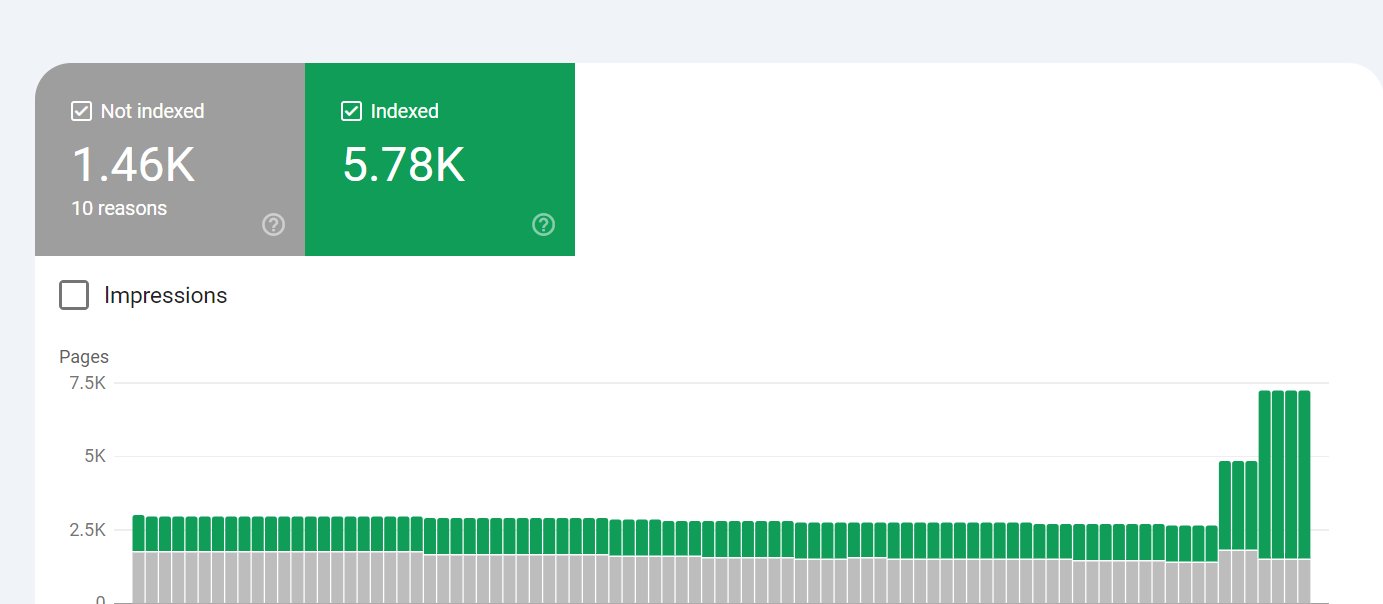
2. Visibility for their product pages increased as well.
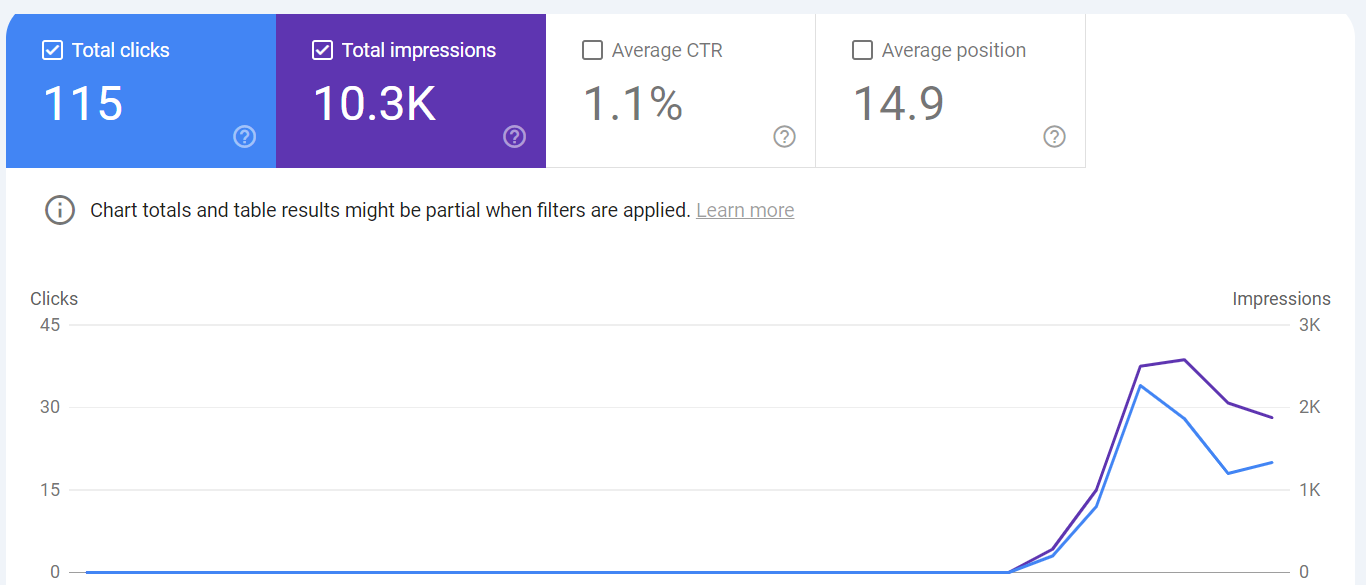
After their product pages were indexed, visibility followed in impressions and clicks. We can see impressions for their product pages go from null to around 2,000 per day, and they started generating clicks (finally, after waiting for one year! A good start comes from the first small step, hehe).
#2 Underrated Preparation for Server Side Rendering
Many times I see sites that have just implemented server side rendering run into something that SEOs or engineers might not see coming, which is related to crawl requests or service requests.
Until the day I write this blog post, server side rendering is the best approach as a starter for indexability. But there are two cases that might happen right after you implement it, especially for huge sites with more than a thousand dynamic pages.
a. Impacting the RPS of Your Services
Since server side rendering means the HTML is generated on the server, your server will call a lot of information within a second and serve the HTML. So there is a risk that your services are affected by a sudden increase in requests (you can call it the origin server, the hosting server, whatever you call it).
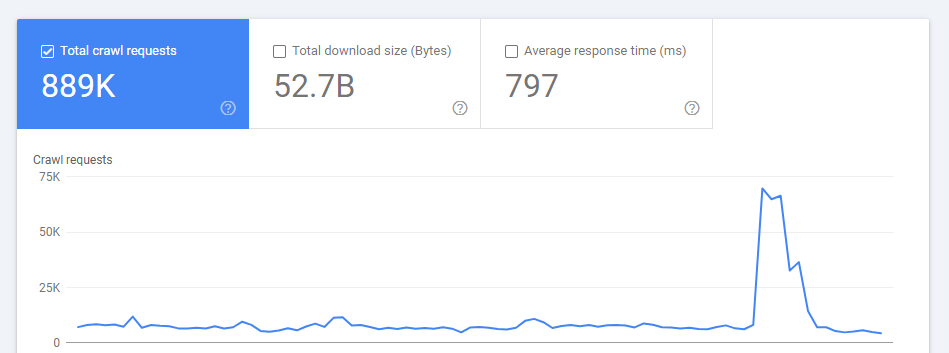
In many cases RPS increases and times out, so a 5xx is returned. So instead of your pages being indexed, your pages get deindexed. This is something you need to consider as well, and you need to discuss it with your engineering team.
From my experience, one solution is to prepare your services with automatic scale up. When your service and its RPS reach the maximum threshold, you need the capability to scale up and adapt to the fluctuating requests. However, if your website is very big and your pages are good, dynamic and unique, Googlebot will always consume your services to the maximum. So you need to consider it and prepare for it.
b. Additional Cost If You Use Prerendering or Caching
“Hey, instead of paying the cost of API requests, let’s just prerender or cache it.”
This looks like the solution and it makes sense. In many cases it can be the solution, especially if your site is small. However, for big sites I see a lot of websites struggle with a prerender or caching system (static HTML, or static site generation, or whatever you call it). Because it is cached or static, you need to save the HTML somewhere, and that becomes your future problem, which might be more expensive than the API call. That problem is storage cost. I am not talking about a hundred pages, but for a website with millions or billions of pages you will see the snowball effect here.
So what is the solution? Do this only for your champion pages. What I mean is that you need to check the most valuable pages you have and focus this method on those pages only, such as the homepage, category pages or blog pages. For the less important ones you can deprioritise them (trim your pages, consolidate your pages, or leave them on client side rendering) and wait until your engineering team finds another proper solution. Every rendering method has a cost, but executing a lot of things in your user’s browser is a cheaper way, and sometimes it is the best practice in particular conditions.
So What Is the Conclusion From My Blog?
I do not know, haha, just kidding. But partially I am serious. I just wrote this based on my thoughts and experience, and you can recap it if it feels helpful, or ask your AI to summarise my thoughts above. Still, server side rendering is a good starter, especially for big websites, and you also need to consider the after effects from a web technical perspective.
There is no scientific formula, no gold bullet (in my country a gold bullet is more perfect than a silver bullet, because of Pitung’s story) and no all in one solution for this. Every business and every website has different conditions, resources and budget.
What I can share from my experience is that we need to adapt everything based on your website’s resources and on cost driven development as well. Because I believe and I think there will never be a website resource or a website condition that meets the perfect conditions.
Got a crawling, rendering, or indexing problem?
Tell me about your architecture, your migration, or the pages search engines and AI keep ignoring. Replies within two business days.
Get in touchNote: engagements involving money games, gambling, or adult websites are not accepted.